

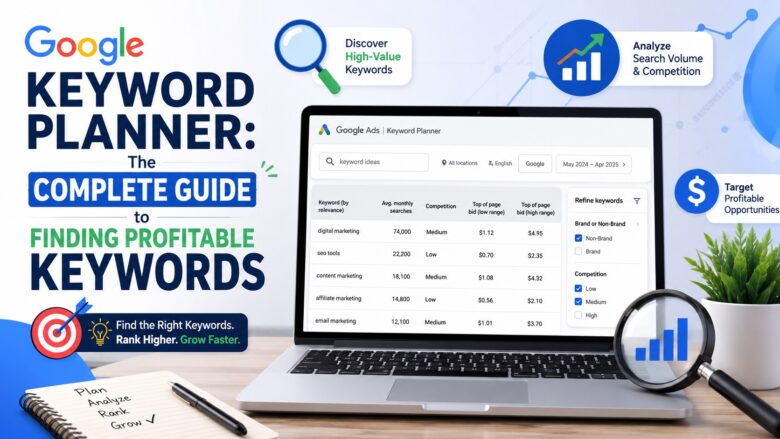
If you want to improve your website’s search engine rankings, choosing the right keywords is the first step. One of the best free tools for keyword research is Google Keyword Planner. Originally designed for Google Ads users, this powerful tool is also widely used by SEO professionals, bloggers, digital marketers, and business owners to discover valuable keyword opportunities.
In this guide, you’ll learn what Google Keyword Planner is, its key features, how to use it effectively, and why it remains one of the most trusted keyword research tools.
What Is Google Keyword Planner?
Google Keyword Planner is a free keyword research tool provided by Google. It helps users discover new keyword ideas, analyze search volume, estimate competition, and forecast advertising performance.
Although the tool is built primarily for advertisers running Google Ads campaigns, it is equally useful for SEO. By understanding what people search for, you can create content that matches user intent and attracts more organic traffic.
Why Use Google Keyword Planner?
There are several reasons why marketers rely on Google’s keyword research tool
- Discover relevant keyword ideas.
- Check monthly search volume.
- Understand keyword competition.
- Estimate cost-per-click (CPC).
- Plan effective SEO and PPC campaigns.
- Identify seasonal search trends.
Using these insights allows you to build a content strategy based on real search data rather than guesswork.
Key Features of Google Keyword Planner
1. Keyword Discovery
Enter a word, phrase, or website URL, and the Google Keyword tool generates hundreds of related keyword suggestions. These ideas help you uncover long-tail keywords that may be easier to rank for.
2. Search Volume Analysis
The tool shows average monthly searches for each keyword, helping you prioritize topics with strong search demand.
3. Competition Level
Google categorizes keyword competition as Low, Medium, or High. While this metric is intended for advertisers, it can also provide useful insights when evaluating keyword popularity.
4. CPC Estimates
SEO keyword tool provides estimated bid ranges, giving you an idea of how valuable a keyword is for advertisers. Keywords with higher CPC often indicate stronger commercial intent.
5. Keyword Forecasts
You can estimate clicks, impressions, conversions, and advertising costs before launching a Google Ads campaign.
How to Use Google Keyword Planner
Getting started is simple.
Step 1: Create a Google Ads Account
Visit Google Ads and create a free account. You don’t have to run paid advertisements to access Keyword Planner.
Step 2: Open Keyword Planner
Inside your Google Ads dashboard, navigate to Tools & Settings and select this tool.
Step 3: Choose a Tool
You’ll see two options:
- Discover New Keywords
- Get Search Volume and Forecasts
Choose the option that best fits your research needs.
Step 4: Enter Your Keywords
Type a keyword related to your niche, product, or service. Google will generate keyword suggestions along with important metrics.
Step 5: Analyze the Results
Review search volume, competition, CPC, and keyword relevance. Select keywords that align with your SEO or advertising goals.
Benefits of Google Keyword Planner for SEO
Even though it’s an advertising tool, the platform offers several SEO benefits.
Find Content Ideas
Keyword suggestions help you discover topics your audience is actively searching for.
Target Long-Tail Keywords
Long-tail keywords usually have lower competition and higher conversion rates, making them excellent targets for new websites.
Understand Search Intent
Keyword data helps you identify informational, navigational, and transactional search intent, allowing you to create more relevant content.
Improve Content Strategy
You can organize keywords into topic clusters and build comprehensive articles that satisfy user needs.
Best Practices for Using Google Keyword Planner
To get the best results:
- Focus on keywords relevant to your audience.
- Combine high-volume and long-tail keywords.
- Don’t rely solely on search volume.
- Consider user intent before creating content.
- Compare Keyword Planner data with other SEO tools.
- Update your keyword research regularly.
A balanced keyword strategy often performs better than targeting only the highest-volume keywords.
Limitations of Google Keyword Planner
Although it is an excellent free tool, it has a few limitations.
- Exact search volume may be shown as ranges for accounts without active ad spending.
- Competition metrics are designed for advertisers rather than SEO.
- It lacks advanced SEO features such as backlink analysis and keyword difficulty scores.
- It doesn’t provide competitor content analysis.
Because of these limitations, many SEO professionals use keyword research alongside other SEO tools for more comprehensive research.
Conclusion
Google Keyword Planner remains one of the most reliable keyword research tools available today. Whether you’re building an SEO strategy, planning a PPC campaign, or creating blog content, it provides valuable keyword insights directly from Google.
By understanding search volume, competition, and keyword trends, you can make smarter content decisions that improve your visibility in search results. While combining it with additional SEO tools can provide even deeper insights, search volume is an excellent starting point for anyone serious about keyword research.
Frequently Asked Questions (FAQs)
Yes. Google Keyword Planner is free to use with a Google Ads account. You don’t have to run paid ads to access the basic features.
Absolutely. Although it’s designed for Google Ads, many SEO professionals use it to discover keywords, analyze search volume, and plan content.
Sometimes. Active Google Ads advertisers often receive more detailed search volume data, while inactive accounts may see broader ranges.
It provides highly reliable data directly from Google. However, many marketers combine it with other SEO tools to gain additional metrics such as keyword difficulty, backlinks, and competitor analysis.
It’s a good practice to perform keyword research regularly, especially before publishing new content or launching marketing campaigns. This helps you stay up to date with changing search trends.