


Understanding Backlinks and Their Role in SEO
Backlinks are one of the most important parts of SEO, and understanding how to remove backlinks from a website is equally important. If you understand them well, you can significantly improve your website’s ranking on search engines like Google.
What Are Backlinks?
Backlinks are simply links from other websites that point to your website. Think of them as digital votes of confidence. When another website links to your content, it signals to search engines like Google that your website might be valuable or trustworthy. In the world of SEO (Search Engine Optimization), backlinks play a major role in determining how well your pages rank in search results.
Imagine running a small café in a busy city. If dozens of popular food bloggers recommend your café, people naturally assume your food must be good. Backlinks work similarly for websites. When reputable websites link to you, search engines interpret that as credibility and authority.
But here’s the catch—not all backlinks are good. Some links come from spam websites, link farms, or low-quality directories. These harmful links can damage your SEO rather than help it. Search engines may treat them as manipulative attempts to boost rankings.
This is why backlink management has become a critical skill for website owners and SEO professionals. Sometimes the best thing you can do for your website’s health is to remove or neutralize harmful backlinks.
Why Backlinks Matter for Search Rankings
Search engines use hundreds of ranking factors, but backlinks remain one of the most powerful signals. When Google evaluates your website, it analyzes not only how many backlinks you have but also the quality, relevance, and trustworthiness of those links.
A backlink from a respected news site or authority blog carries far more weight than dozens of links from spam sites. Quality always beats quantity in modern SEO. Google’s algorithms are now sophisticated enough to detect manipulative link schemes and unnatural linking patterns.
Bad backlinks can cause several problems:
- Reduced search rankings
- Google manual penalties
- Lower website authority
- Decreased organic traffic
Google even created a special tool to deal with harmful links. This tool enables website owners to instruct Google to disregard specific backlinks when assessing their site.
Understanding how backlinks affect SEO is the first step toward learning how to remove them effectively. Once you know the role they play, it becomes easier to recognize when a backlink is helping your site—or quietly hurting it.
Why You May Need to Remove Backlinks
Toxic or Spammy Backlinks
Not every backlink pointing to your website is beneficial. Some backlinks are considered toxic because they originate from low-quality or spammy websites. These links often appear on sites filled with advertisements, automated content, or suspicious domains.
Spam backlinks can appear for several reasons. Sometimes they happen naturally when scrapers copy your content. Other times, they may be created intentionally by competitors through negative SEO tactics. In many cases, they come from outdated link-building strategies such as buying links or submitting your site to thousands of directories.
Search engines aim to provide users with high-quality results. Because of this, they penalize websites that appear to manipulate rankings with unnatural link schemes. Toxic backlinks can therefore harm your website’s reputation in the eyes of search engines.
Examples of toxic backlinks include:
- Links from spam directories
- Links from hacked websites
- Links from irrelevant foreign websites
- Links from private blog networks (PBNs)
- Site-wide footer or sidebar links
When these links accumulate, they can distort your backlink profile and create the impression that your website is engaging in manipulative SEO tactics.
Google Penalties and Manual Actions
One of the biggest reasons website owners remove backlinks is to recover from Google penalties. A penalty occurs when Google determines that your site violates its quality guidelines.
There are two main types of penalties:
| Algorithmic penalty | Automatic ranking drop due to suspicious link patterns |
| Manual action | A human reviewer at Google flags your website |
Manual actions are especially serious. When Google issues one, your site can lose a large portion of its organic traffic overnight.
Google recommends trying to remove harmful links manually before using the disavow tool.
Removing bad backlinks helps demonstrate that you are actively cleaning your website and following Google’s guidelines. Once harmful links are removed or disavowed, rankings can gradually recover.
How to Identify Bad Backlinks
Using Google Search Console
Before removing backlinks, you must first identify them. One of the best free tools for this is Google Search Console.
Search Console provides a detailed list of websites that link to your domain. You can view:
- Top linking sites
- Most linked pages
- Anchor text used in links
By analyzing this data, you can identify suspicious websites that link to you.
For example, if you run a digital marketing blog and suddenly receive hundreds of backlinks from gambling websites, that’s a clear warning sign. These links are irrelevant and potentially harmful.
Look for these warning signals when analyzing backlinks:
- Strange domain names
- Foreign language sites unrelated to your niche
- Websites with extremely low authority
- Pages filled with spam content
Carefully reviewing this information helps you build a list of backlinks that might need removal.
Using SEO Tools (Ahrefs, SEMrush, etc.)
While Search Console is useful, professional SEO tools provide deeper insights into backlinks. Tools such as Ahrefs, SEMrush, Moz, and Majestic analyze millions of websites and generate detailed backlink reports.
These tools often include metrics like:
- Domain authority
- Spam score
- Referring domains
- Link quality indicators
With these metrics, you can quickly identify which backlinks are beneficial and which ones could harm your SEO.
For example, if a backlink comes from a website with a high spam score and zero organic traffic, it’s probably not a link you want associated with your site.
Using multiple tools together gives you the most accurate picture of your backlink profile. Once you have identified harmful links, the next step is removing them.
Learn How to Remove Backlinks from Website
Contact the Website Owner
The most direct method of removing a backlink is to contact the owner of the website that created the link.
If a spam or low-quality site links to you, you can request that they remove the link. This approach is often recommended as the first step before using other tools.
The process usually involves:
- Finding the website’s contact email
- Sending a polite removal request
- Waiting for confirmation
Many website owners are willing to remove links if you ask professionally.
Request Link Removal Politely
When requesting backlink removal, your message should be polite and concise. Remember, the website owner may not even realize the link is causing problems.
A simple email template might look like this:
Hello,
I noticed that your website contains a link pointing to my site.
Unfortunately, this link may negatively affect our SEO profile.
Could you please remove it?
Thank you for your time.
Being respectful increases the chances of a positive response.
Track Removal Requests
Backlink cleanup can involve dozens or even hundreds of requests. Tracking them is important.
A simple spreadsheet can help you monitor:
- Website URL
- Contact email
- Date of request
- Response status
This organized approach helps ensure you don’t lose track of which links have been removed and which still require action.
Using Google Disavow Tool
What Is the Disavow Tool
Sometimes, website owners refuse to remove backlinks. In other cases, the websites may be inactive or impossible to contact.
This is where the Google Disavow Tool becomes useful.
The disavow tool allows website owners to submit a list of links that they want Google to ignore when evaluating their site.
Important detail: disavowing does not delete the link from the internet. It simply tells Google not to consider that link when assessing your website’s ranking.
When You Should Use Disavow
The disavow tool should only be used in specific situations:
- Your site received a manual penalty.
- Your backlink profile contains many spam links.
- Manual removal attempts failed.
SEO experts recommend using this tool cautiously because disavowing good links can hurt your rankings.
Step-by-Step Guide to Disavow Backlinks
Creating the Disavow File
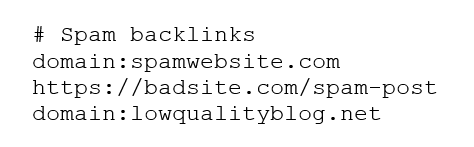
The first step is creating a disavow file. This file is a simple .txt document listing all backlinks you want Google to ignore.
Formatting rules include:
- One URL per line
- You can disavow entire domains using domain:example.com
- Comments can be added using #
Example:
Uploading the File in Google Search Console
After creating the file, upload it to Google’s Disavow Tool.
Steps include:
- Open Google Search Console
- Select your website property.
- Go to the disavow tool page.
- Upload your .txt file.
Google will then process the request as it recrawls the web. This process can take several weeks before changes appear in rankings.
Best Practices for Backlink Cleanup
Avoid Removing Good Links
One of the biggest mistakes beginners make is removing high-quality backlinks. Not every unfamiliar link is harmful.
Before removing a backlink, ask yourself:
- Is the website relevant to my niche?
- Does it have real content and traffic?
- Is the link natural?
If the answer is yes, you probably shouldn’t remove it.
Monitor Your Link Profile Regularly
Backlink management is not a one-time task. Websites constantly gain new links over time.
Regular monitoring helps you detect suspicious links early. Many SEO professionals review backlink profiles monthly to keep their websites healthy.
Common Mistakes When Removing Backlinks
Disavowing Too Many Links
The disavow tool is powerful but risky. Submitting a large list of domains without proper analysis can damage your SEO.
Removing too many backlinks reduces your website’s authority and may lead to ranking drops.
Ignoring Manual Outreach
Some website owners skip manual outreach and immediately use the disavow tool.
Google actually recommends trying to remove harmful links manually first before disavowing them.
Manual removal demonstrates good faith and may resolve the problem without further action.
Tools That Help Remove Backlinks
Several tools can simplify the backlink removal process.
| Google Search Console | Free backlink monitoring |
| Ahrefs | Detailed backlink analysis |
| SEMrush | Toxic link detection |
| Moz | Domain authority evaluation |
These tools help you analyze backlinks, identify harmful links, and prepare disavow files.
Final word for How to Remove Backlinks from Website
Removing backlinks from a website is an important part of maintaining a healthy SEO profile. While backlinks are generally beneficial, low-quality or spammy links can damage your website’s credibility and search rankings. Learning how to identify, remove, and disavow harmful links helps protect your site from penalties and improves your overall SEO performance.
The process usually involves three main steps: identifying toxic backlinks, requesting manual removal, and using the Google Disavow Tool when necessary. Each step requires careful analysis to ensure you don’t accidentally remove valuable links.
Managing backlinks is an ongoing task rather than a one-time fix. By regularly monitoring your link profile and addressing harmful links early, you can maintain a strong, trustworthy website that search engines are happy to rank.
FAQs
Yes, but you usually need to contact the website owner and request link removal. If that fails, you can use Google’s disavow tool to ignore the link.
No. Disavowing backlinks simply tells Google to ignore them when evaluating your site.
Manual removal can take a few days or weeks, depending on responses. Disavow requests may take several weeks for Google to process.
No. High-quality backlinks improve rankings, but spam or low-quality links can harm your SEO.
Not necessarily. Many websites never need it. It’s typically used only when spam backlinks or manual penalties occur.